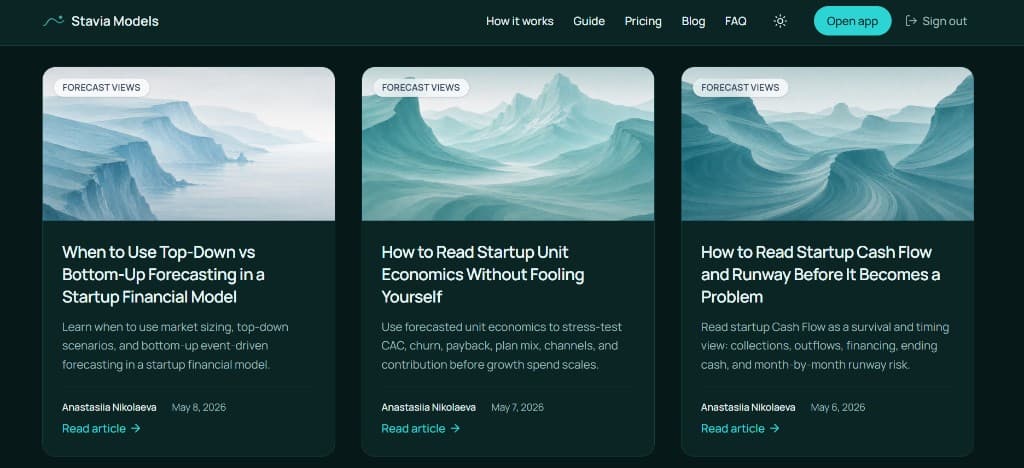
Overview
Case snapshot
A product-led AI content workflow built around real Stavia Models logic.
- Product
- Stavia Models — a guided financial modeling product for SaaS, subscription and AI founders.
- Goal
- Create a repeatable content system that turns product logic into articles, visual explainers and LinkedIn assets.
- Core source
- Stavia Models product logic, real screenshots, AI-assisted research and my expert comments.
- Workflow
- AI helps select angles, extract logic, draft articles, build pages, create visuals and repurpose content.
- Outputs
- SEO articles, interactive explainers inside articles, LinkedIn posts and carousel PDFs.
- Human role
- I guide the strategy, add examples, review the logic, adjust the tone and approve the final materials.
The product logic behind the system
Stavia Models is a guided financial modeling and decision-support product for SaaS, subscription and AI founders. The product helps founders work through pricing, acquisition, churn, costs, payroll, runway, fundraising and unit economics in one connected model. That structure became the base for the content system.
Instead of starting each article from an empty prompt, I use the product, the modeling methodology behind it and my consulting experience as the source layer. AI helps me extract, structure, write, implement and repurpose the material, but the core logic comes from work that already exists.
Stavia Models needed more than a blog with general startup advice. The product itself contains a structured way of thinking about startup financial modeling, and I wanted the content to make that logic visible.
The content system now connects several layers:
- real product logic inside Stavia Models;
- financial modeling templates and consulting experience behind the product;
- founder questions that naturally turn into article topics;
- AI-supported drafting and implementation;
- interactive article blocks;
- LinkedIn text posts;
- carousel PDFs generated through a reusable Cursor workflow.
The result is a content workflow where each article becomes more than a single page. It becomes a source asset for SEO, social content, internal links, guide chapters and future educational materials.
Strategy
The strategy behind the content system
Content plan
The content plan starts from Stavia Models product logic. Each article explains one modeling decision or one part of the product logic: pricing, acquisition, AI/API costs, cost structure, runway, financing timing, unit economics and related founder questions.
Topics are selected because they connect three things: what founders need to understand, what they search for, and what Stavia actually helps them model.
Benchmark + process
On the SaaS pricing benchmark article, I define article structure, page layout, visual rhythm, screenshot logic, interactive block approach, CTA placement and the repeatable article workflow.
After the benchmark is polished, the process is documented — angle, extraction, drafting, implementation, visuals, review, distribution — so I can return to the same workflow with AI for every next topic.
Distribution system
Each article is planned as a reusable source asset, not only as a blog post.
After publication it can become a LinkedIn text post, carousel PDF, guide section, internal links and educational material. The benchmark article also helps create and test the carousel/PDF generation workflow.
Workflow / 01
I turn the next topic into an article brief with AI
Once the content strategy is set, the next article starts from one topic in the Stavia content plan.
I ask AI to turn that topic into a working brief: what founder decision the article should explain, which part of Stavia product logic should be used, what screenshots or examples may help, and what the final article should become after publication.
For the benchmark article, the topic was SaaS pricing before launch. The brief had to connect pricing inputs with billing mix, churn, cash timing, recognized revenue and unit economics.
I review the first AI answer and correct the direction if needed. This is where I add the expert layer: which examples are more realistic, which angle is stronger, which parts should be removed, and where the article needs a clearer connection to the product logic.
Brief output
- Founder decision
- What should the reader understand or decide after reading?
- Product logic
- Which part of Stavia Models explains this decision?
- Article structure
- What sections should the article include?
- Evidence
- Which screenshots, examples, benchmarks or calculations can support it?
- Future use
- Can this article later become a LinkedIn post, carousel, guide section or internal link?
Prompt logic
At this point, the AI already knows the project context, content strategy and article workflow.
I only need to give the next topic and ask it to start the first stage:
Let’s create the article on [topic]. Start with the article brief. Suggest the angle, structure, key sections and visual ideas.
Then I review the brief, correct the angle and add examples before moving to drafting.
Workflow
I use Cursor to extract the product logic
After the article brief is clear, I do not ask AI to write from general knowledge. I ask Cursor to inspect the exact Stavia Models product area behind the topic.
For the benchmark SaaS pricing article, the source was the Pricing input tab. Cursor analyzed the pricing inputs and the dependent calculations across the forecast, P&L, cash flow and unit economics.
This gives me a writer-friendly but technically accurate source summary: what users enter, what each input means, how it affects the model, and which outputs change.
That summary becomes the bridge between the product and the article. It gives ChatGPT real logic to work with, and it gives me something concrete to review before drafting.
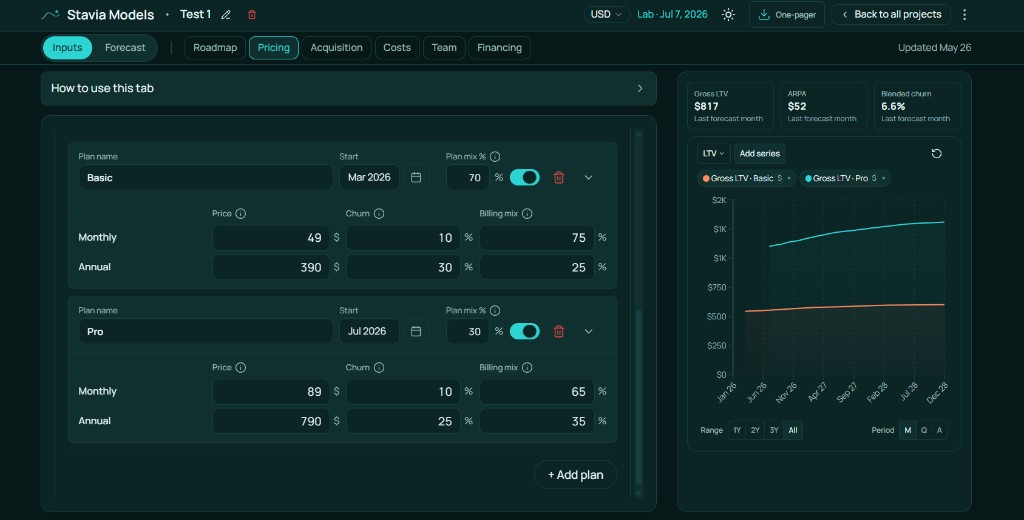
Pricing inputs inside Stavia Models: plan mix, monthly and annual prices, churn and billing mix become the source logic for the article.
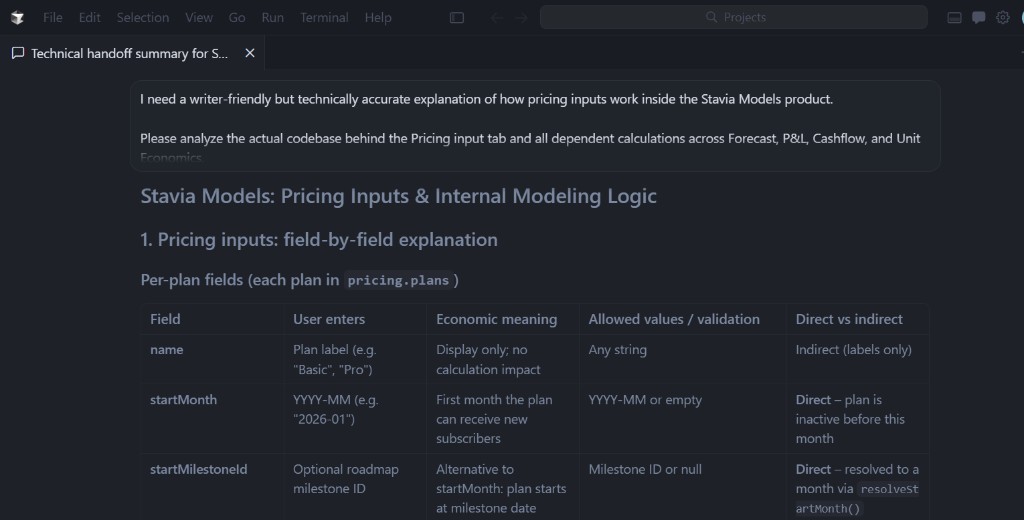
Cursor turns the product/codebase logic into a writer-friendly technical summary before the article is drafted.
Prompt logic
At this stage, I give Cursor the article topic and the exact product area to inspect:
Analyze the [product section] and its dependent calculations. Explain what inputs exist, what each input means, how it affects the forecast, and what a writer should understand before drafting the article.
I review the extraction for accuracy before using it as article source material.
Workflow
I create the first draft from the extracted logic
Once I have the article brief and the Cursor extraction, I can move to the first full draft.
The brief gives the article direction and structure. The extraction gives the product logic: how the relevant part of Stavia Models works, what inputs matter, how they affect the forecast, and what the reader should understand.
At this stage, I ask ChatGPT to turn those materials into a readable article draft. I also add my own comments: examples I want to include, places where the explanation should be clearer, benchmarks that may help, and phrases that do not sound like my style.
The goal of this stage is not a final article. It is a strong working draft that already follows the agreed angle, stays grounded in product logic, and shows where screenshots, visual explainers or interactive blocks should appear.
After that, I review the draft for logic, tone, examples and missing context before sending it to Cursor for page implementation.
Draft inputs
Prompt logic
I ask AI to use the approved brief and Cursor extraction as the source for the first draft:
Use the article brief and product logic extraction to write the first draft. Keep the article grounded in Stavia Models logic, follow the agreed structure, suggest places for screenshots or visuals, and flag unclear points instead of inventing details.
Then I review the draft for accuracy, examples, tone and missing product context.
Workflow
I prepare the Cursor task and build the article page
After the draft is ready, I do not send a raw text document to Cursor. I first ask ChatGPT to turn the approved draft into a clear implementation task for my coding assistant.
That task explains what page to create, which article structure to follow, where screenshots should be placed, what visual blocks may be needed, how the CTA should work, and what needs to be checked after implementation.
Then I move to Cursor. In my workflow, Cursor creates the code-first article page inside the Stavia Models website. It can create the page structure, connect metadata, add layout blocks, prepare visual sections and place screenshots or placeholders.
At this stage I still give very specific comments. I correct the text, adjust the order of blocks, add notes about the visual rhythm and usually provide real screenshots manually. Cursor can help create visual components, but screenshots from the product are often faster and cleaner to capture by hand and then add as assets.
The result of this stage is a live article page draft that can be reviewed in the browser before publication.
Implementation checklist
- Page route
- Metadata
- Article sections
- Screenshots / assets
- Visual blocks
- CTA
- Mobile and SEO checks
Prompt logic
What I ask ChatGPT before moving to Cursor
The draft is approved.
Prepare a clear task for Cursor: route, page structure, design references, screenshots or placeholders, visual blocks, CTA, metadata and QA checklist. Keep the text close to the approved draft and mark anything that still needs my decision.
Workflow
I add interactive blocks when the logic needs to be felt
For Stavia Models articles, I use interactive blocks when a financial idea is easier to understand by changing inputs than by reading another paragraph.
Financial modeling has a lot of formulas, links and assumptions. My goal is to explain that logic simply, so founders can see how one decision affects the model.
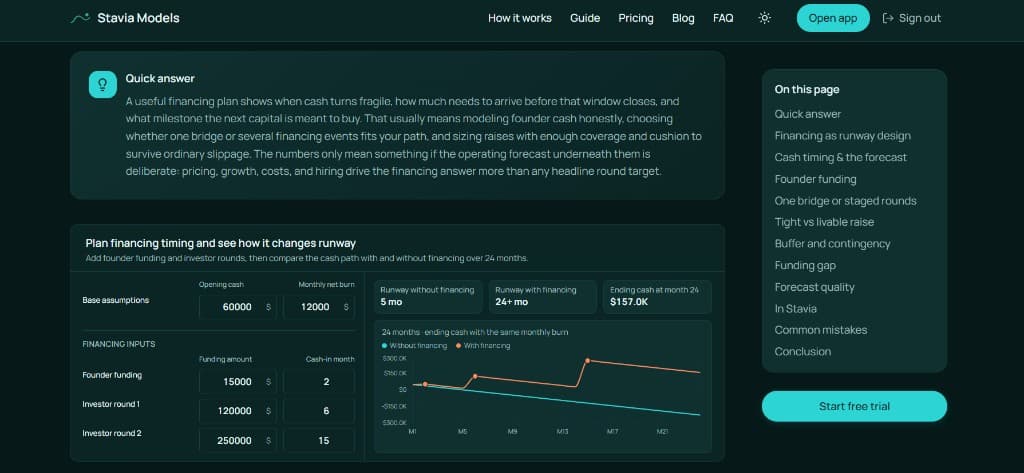
That is why some articles include small interactive modules: pricing assumptions, acquisition channels, AI/API usage, cost structure, hiring timing or runway scenarios.
These blocks are worth the extra effort because they make the article more intuitive. The reader can change a few assumptions and immediately see what moves: revenue, cash timing, CAC, margin, burn or runway.
AI coding assistance makes this practical. I usually know the simplified logic I want to show because it comes from the product. AI can suggest interface ideas, but the important part is giving it a clear model: which inputs the reader should change, which output should react, and what the block should help them understand.
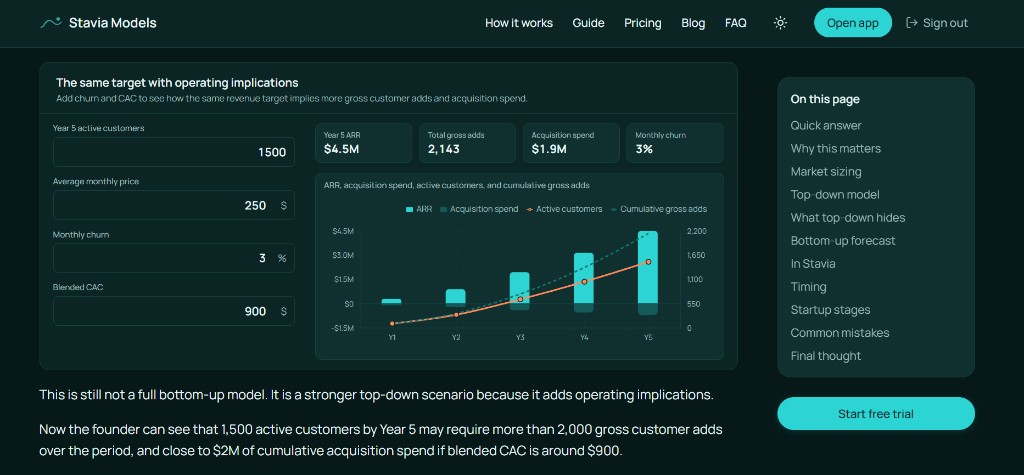
A top-down module helps readers see how the same revenue target implies different gross adds, acquisition spend and operating implications once churn and CAC are added.
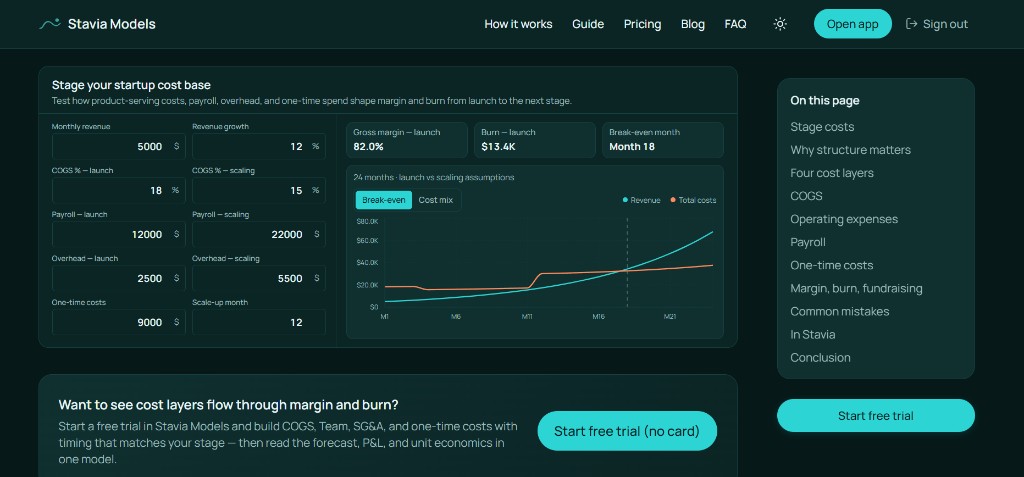
Another module can focus on costs, AI/API usage, hiring timing or runway scenarios, depending on the article topic.
Prompt logic
I give the AI coding assistant the simplified model:
which inputs the reader can change, which outputs should react, and what financial idea the block should make easier to understand.
Then I review whether the interaction is clear enough and does not overcomplicate the article.
Workflow
The article becomes social media content
After the article is published, I use it as a source asset for social media.
For Stavia Models, the main platform is LinkedIn because the product, topics and audience fit the context there: founders, SaaS builders, consultants, investors and people interested in startup finance.
But the same article can be adapted for other channels too. Sometimes I prepare Telegram posts, and the same logic could work for other platforms if the angle, tone and format are adjusted to the audience.
The important part is that I do not ask AI to simply summarize the article. I ask it to find a social media angle: one specific idea, founder problem, modeling mistake, practical insight or example that can stand on its own and then point back to the full article.
This makes each article reusable without making every post feel like a smaller copy of the same text.
Prompt logic
I give AI the article and ask for one strong social media angle, not a summary:
Take this article as the source and draft a LinkedIn post for founders around one strong idea from it, keeping the tone practical and close to my voice instead of summarizing the whole piece.
Then I review the post so it sounds like my voice and does not lose the logic of the original article.
Workflow
I built a code-first slide system for carousel PDFs
After the article is published, I sometimes turn it into a LinkedIn carousel. Instead of using a separate slide tool, I built a reusable slide-generation system inside the project itself.
The idea was simple: if Stavia Models already has its own product style, website components and visual language, I can reuse that same logic to generate slides in code.
Inside Cursor, I created a small system that works with reusable slide templates, a working deck and benchmark examples. It lets me keep the same colors, typography, spacing and overall product feel while generating a carousel preview and a final PDF.
The process starts with the article, but the carousel is not a direct copy of it. First I define a separate angle for the slides: one practical idea, framework or founder question that works well in a short visual sequence. Then ChatGPT helps prepare the slide logic, and Cursor turns it into slides inside the existing generator.
This approach is useful beyond LinkedIn. The same code-first system can be used to generate other presentations, one-pagers or schematic visual materials based on the product and its content.

A published Stavia carousel on LinkedIn: the article is reused as a visual content format with a narrower angle and stronger slide-by-slide structure.
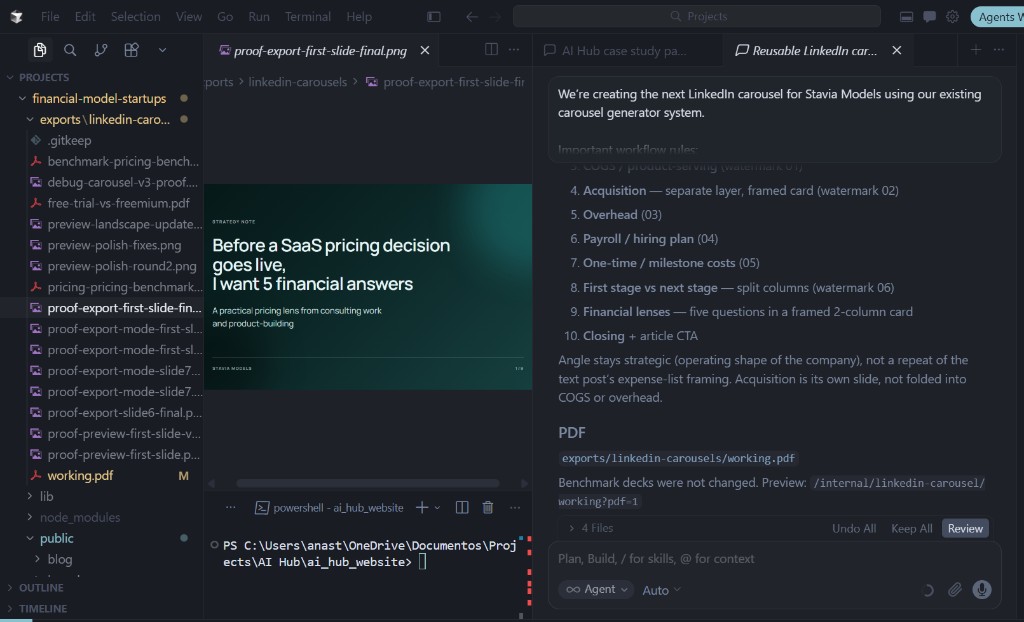
Inside Cursor, I use a reusable slide-generation system with benchmark decks, a working file, preview logic and PDF export in the Stavia visual style.
Prompt logic
Take this article as the source and create a carousel angle for it.
Then prepare a Cursor task to build the slides inside the existing generator, using the Stavia style system and keeping the structure concise, visual and ready for PDF export.
Then I review the angle, slide flow and visual clarity before exporting the final PDF.
Content reuse loop
One source article feeds multiple formats across the cluster
- Blog article
- Social post
- Carousel PDF
- Internal links
- Future guide
- Product education
Each output reuses the same source logic, but the format, angle and depth change depending on where the content appears.
- Source article
- Blog article
- Social post
- Carousel PDF
- Internal links
- Future guide
- Product education
Outcome
What this system makes possible
This system changes the work after the first few articles.
The first benchmark article takes the most effort. It is where I define the writing standard, the page structure, the design rhythm, the screenshot logic, the role of interactive blocks and the workflow from idea to publication. It is not the fastest article to produce, but it becomes the reference point for everything that follows.
The next articles still need close review. I check the logic, correct the angle, rewrite parts that do not sound like me, comment on the page structure, adjust the visuals and explain what should be done differently next time. This stage is important because every correction becomes part of the system.
After several iterations, the workflow becomes much lighter. I can collect my repeated comments, ask AI to find the patterns in them, and turn those patterns into clearer instructions for the next articles. The AI starts to anticipate more of the corrections I usually make: how I explain the logic, what I remove, where I add examples, how I want the page to feel, and what kind of social media angle works better.
For Stavia Models, this matters because the content follows the product itself. Pricing, acquisition, costs, runway and unit economics are connected inside the model, so the articles also need to build on each other. One article explains one part of the logic, then becomes material for internal links, LinkedIn posts, carousel PDFs and future guide sections.
At this stage, my prompts are much shorter. I can take the next topic from the content plan and ask AI to go through the documented workflow step by step. The system already knows the benchmark, the structure, the review logic and the expected outputs.
That is the real outcome: the work becomes repeatable without becoming generic. The benchmark sets the standard, the first iterations teach the system, and the next articles move faster because the process already contains my previous decisions, comments and corrections.
What compounds over time
Source material
Product logic, screenshots and expert comments become reusable inputs.
Page system
Benchmark structure and documented workflow reduce the work needed for every next article.
Distribution
Each article can become posts, carousel PDFs, guide sections and internal links.
Product education
The content cluster explains how the product thinks, not only what the product does.
Transfer
What other experts and businesses can adapt
This workflow is not only useful for SaaS products.
The same logic can work for experts, consultants, educators, agencies and businesses that already have knowledge inside their work, but do not yet have a clear system for turning it into public content and reusable assets.
The source layer can be different from mine.
The important part is to stop treating AI as a blank-page writing tool. It works much better when it is connected to a real source base and a repeatable process.
A transferable AI content system needs five things:
- Source base The product logic, documents, examples, cases, recordings or internal knowledge that AI can work from.
- Content strategy A clear map of topics, audience needs, search intent and business goals.
- Benchmark format One strong first article or page that defines the structure, visual rhythm, quality bar and implementation pattern.
- Production workflow A documented sequence: brief, source extraction, draft, page implementation, visual assets, review and repurposing.
- Human review Someone still needs to check the logic, examples, tone, accuracy, visuals and final publication decision.
This is where AI becomes useful for real expert work. It can extract, structure, draft, implement and repurpose, but it performs best when the expert gives it context, source material and clear review points.
For a business, this can become a content system. For an expert, it can become a way to turn thinking into articles, materials, products and public assets. For a team, it can become a shared workflow instead of a collection of disconnected AI experiments.
The adaptable system
Next step
Want to build a similar AI-assisted content system?
If you already have expertise, product knowledge, documents, course materials or client work, AI can help turn them into a repeatable content workflow. The useful part is not one perfect prompt — it is the system around the prompt: source material, roles, review points, implementation process and distribution logic.

